General Settings
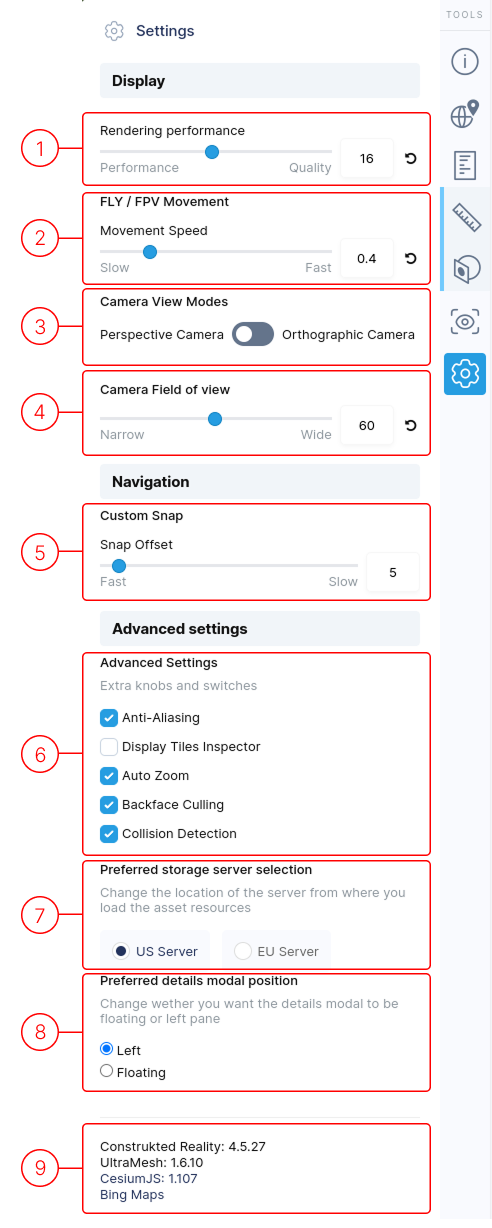
1. Rendering Performance
Section titled “1. Rendering Performance”Adjusts visual quality of the displayed 3D model.
2. FLY/FPV Movement Speed
Section titled “2. FLY/FPV Movement Speed”Controls movement speed in FPV or FLY navigation modes.
3. Camera View Mode
Section titled “3. Camera View Mode”Switch between Perspective and Orthographic modes:
- Perspective: Renders with depth (objects appear smaller as they get further)
- Orthographic: Renders without depth, keeping objects at same scale
4. Camera Field of View
Section titled “4. Camera Field of View”Adjusts the camera’s view angle, changing visible scene area and perceived depth. (Only visible in Perspective mode)
5. Snap Offset
Section titled “5. Snap Offset”[Description needed]
6. Advanced Settings
Section titled “6. Advanced Settings”- Anti-Aliasing: Toggles smoothing of jagged edges for improved visual quality.
- Display Tiles Inspector: Shows debug info about 3D tiled display.
- Auto Zoom: Controls whether operations re-frame the view (can be turned off).
- Backface Culling: Renders backside as transparent by default; disable to see it.
- Collision Detection: Camera can’t move through geometry by default; turn off for unrestricted movement.
7. Preferred Storage Server
Section titled “7. Preferred Storage Server”Select which server (USA or EU) to load assets from, based on your location:
- Faster loading if server is closer to you
8. Preferred Details Modal Position
Section titled “8. Preferred Details Modal Position”[Description needed]
9. Version Numbers
Section titled “9. Version Numbers”Shows current website version and tool versions used. (Bing Maps attribution for terrain imagery)