Annotation Manager
The Annotations menu displays measurements taken using the “measure” tools. For better organization, group measurements into layers using the [ + ] button (see item 3) and drag individual measurements into new layers.
Annotation list
Section titled “Annotation list”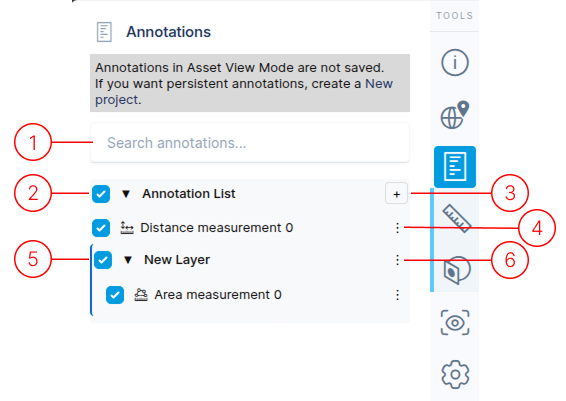
The search field allows searching for any text within the annotation list.
This is the top-level container for all annotations.
The [ + ] button creates new layers. Layers and annotations can be dragged within the list for better organization.
Each annotation has a menu with three options:
- Edit: Opens the annotation details panel.
- View: Centers the camera on the annotation.
- Delete: Removes the annotation from the list.
Layers help organize multiple annotations. They can be collapsed or expanded using the triangle icon next to the layer name.
Layers have two menu options:
- Rename: Edit the layer name.
- Delete: Remove the layer (annotations will move to the main annotation list).