
Asset General Settings
Open Settings using the gear icon in the right toolbar. The controls below describe the current viewer. Some controls depend on whether you own the asset or have administrator access.
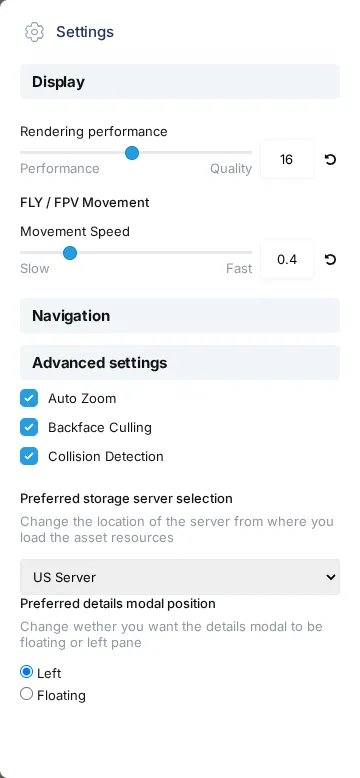
GW4, September 2026. Owner and administrator controls are described below; they do not appear in this account’s panel. Scroll down for version information.
Display and movement
Section titled “Display and movement”Rendering performance changes the balance between rendering detail and performance. FLY / FPV Movement Speed adjusts movement in those navigation modes. Use the reset icon beside a setting to restore its default.
Use the top-left 3D / 2D / 2DN menu for view modes. The older Camera View Modes and Field of View controls shown in previous Settings screenshots are no longer in this panel.
Advanced settings
Section titled “Advanced settings”- Anti-Aliasing: Smooths jagged edges. This control is shown to the owner.
- Display Tiles Inspector: Displays diagnostic tile information. This control is shown to the owner.
- Auto Zoom: Controls automatic reframing where the viewer offers it.
- Backface Culling: Hides back-facing geometry when enabled. Turn it off to inspect the reverse side of a surface.
- Collision Detection: Controls whether the camera is blocked by geometry.
Administrators can also see Custom Snap, which sets the snapping tolerance in screen pixels, and memory statistics. Those controls aren’t part of an ordinary customer’s Settings panel.
Server and panel preferences
Section titled “Server and panel preferences”Preferred storage server selection is a dropdown of the configured storage servers. Changing it reloads the page. The choices can differ from the two server buttons in older screenshots.
Preferred details modal position offers Left and Floating. Choose where you prefer to read and edit details.
Version information
Section titled “Version information”The bottom of the panel identifies Construkted Reality, CesiumJS, and TileForge. Expand TileForge to see the individual tool versions. Include the website version when reporting a viewer problem to support.