You can place your 3D scan asset anywhere on the planet.
We recommend that you place it in the correct geographical location.
If your point cloud was alreagy geo-referened before uploading, it will appear in the correct location on the planet.
If you uploaded a polygon mesh model, you will have to geo-locate it yourself.
To adjust the geo-location of your asset:
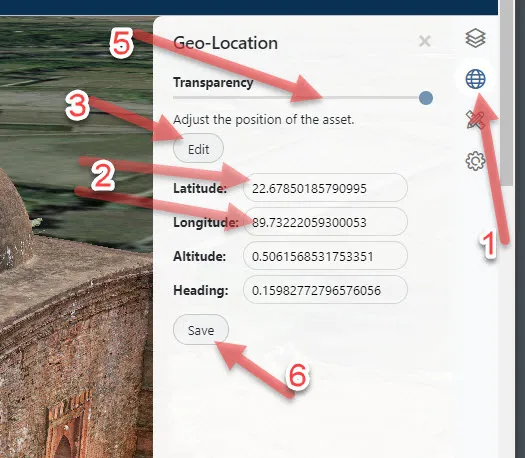
- Open the Geo-Location pop-out menu
- Enter the approximate Latitude and Longitude of your asset
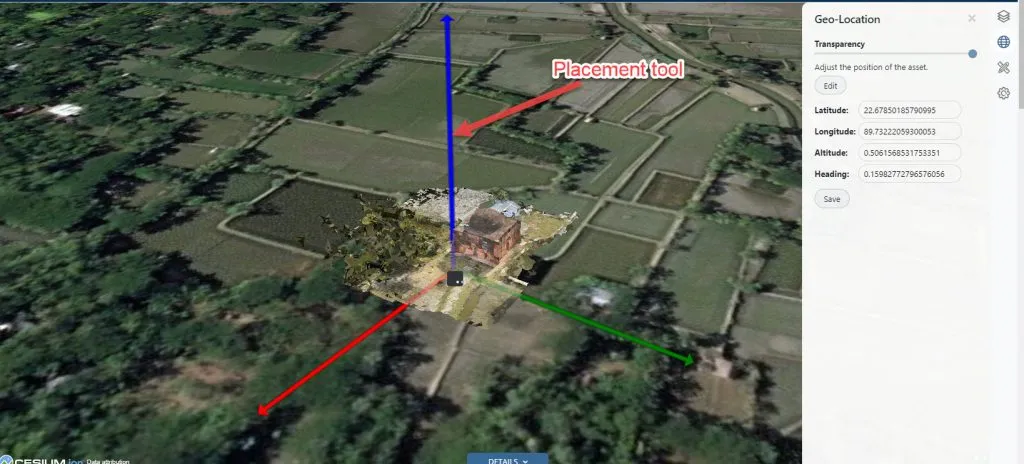
- Click the Edit button to open the asset placement tool.
- Move the asset around with the placement tool until it’s in the right location by aligning it with the map imagery.
- To assist in the asset placement use the Transparency slider to make your asset translucent.
- Once you’re happy with the location, click the Save button